Aside from the free plan, JapanesePod101 has 3 paid member plans: Basic, Premium and Premium Plus. In this quick guide, you’ll learn the difference between the plans. But, to make it a long story short…
- Basic: lessons, lesson notes, and app access.
- Premium has everything in Basic plus study tools.
- Premium Plus has everything in Premium plus access to an on-site teacher.
But first, let’s get into the plans in more detail.
The Basic Plan.
The Basic plan gives you:
- The lesson library (1000s of audio and video lessons)
- Across all levels: from Absolute Beginner to Advanced
- Lesson notes for every lesson: These contain in-depth grammar explanations, sample sentences, vocabulary and cultural insights. The point is to use these to read along or review and gain a greater understanding of the Japanese taught in the lesson.
- Basic app access: You access get the lessons and lesson notes via the App.
- Dashboard: The Dashboard keeps track of your lessons and gives you the next one in line. So, when you log in, you can see that you have lesson #7 to do next. This feature’s a bit useless with a free account but is a lifesaver with paid plans.
Click here to compare JapanesePod101 Basic vs Premium vs Premium Plus.
The Premium plan.
The Premium plan is known for the extra study tools to help you learn faster and practice Japanese.
The Premium plan gives you:
- Everything in Basic (The lessons, lesson notes, and the dashboard)
- Premium app access (you can unlock study tools like the Dialogue Track, Line-by-Line Audio, Expansion, Vocabulary and the Review Track.)
- Line-by-Line (for Audio lessons only): Since you learn a conversation in every lesson, the line-by-line is a breakdown every line in the conversation. Along with translations and romanizations. That way, you can play one line at a time again and again to master those fast, native-level conversations.
- Voice Recording Tools: You’ll find this in the Line-by-Line. With the voice recorder, you can record and compare yourself with the native speaker from the lesson dialogue. Just look for the microphone icon next to each line in the line-by-line. This is to practice your speaking and pronunciation and compare your speaking with native speech.
- Dialogue Track (for Audio lessons only): Remember, each lesson teaches you a practical conversation. And the dialogue track is JUST the conversation. No explanations. No translations. It’s quite quick; 10-30 seconds maximum. So, if you finish a lesson and want to hear just the Japanese conversation, play this track. You can also download and save the conversations to a playlist on your phone and review them to improve listening and memory.
- Vocabulary Section: This is available on most lessons. Here, you get a list of the key words or phrases used in the lesson. You can either review words here with a Quix, a Slideshow, or send those words to Flashcards or the WordBank.
- Review Track (for Audio lessons only): In every lesson, you learn a whole bunch of new words that you’ll find in the Vocabulary section. You can also listen to this review track and hear the words. So, it’s a vocabulary- specific audio of that lesson.
- 2000 Core Word List: Here, you get the 2000 most commonly used Japanese words broken down by categories and other denominations like: top 100 words, top 200, 300, and so on. You can study these words with the Flashcards and/or the WordBank.
- Spaced Repetition Flashcards: Spaced repetition is a fancy word of saying “testing over time.” See, in order to truly master what we learn, we need to test ourselves. But the problem is, we need to stop and remember to sit down, and also remember what we need to study. So, that’s where “Spaced Repetition” technology comes in. Technology can remind you and test you. So, Spaced Repetition Flashcards quiz you on words to help you boost your memory. If you learned a new word today, you’ll see it again tomorrow, then in 2 days, then in 4 days, then 8 days…and space it out over time so you don’t forget. If you get a word wrong, the flashcards will keep giving you the word until you get it right.
- You can create flashcard decks based on words from lessons or use JapanesePod101’s suggested decks.
- WordBank: With this, you can save words from lessons and vocab lists in one place — the word bank. So, if you come across a new word or phrase you’d really like to remember, save it here. One nice feature to this tool is that you can export words as PDFs, Excel/CSV files, or into a printer-friendly doc. Yes, you can make your own printable vocabulary lists.
- Premium Assignments:
- Apple TV Access
JapanesePod101 Basic vs Premium
JapanesePod101 Basic vs Premium comes down to…
- Do you want just the lessons or the full program?
You can either just go with the lessons and lesson notes… or get the extra study tools to help you grasp the Japanese faster.
Click here to compare JapanesePod101 Basic vs Premium vs Premium Plus.

The Premium Plus plan.
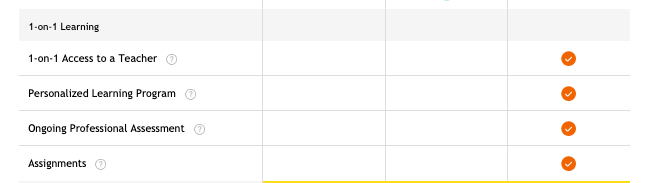
Premium PLUS includes everything in Premium as well as some personalized options.
- Your own teacher: You get access to an on-site teacher via the My Teacher Messenger Tool. You can send them messages, practice your Japanese, ask questions, and anything that confuses you in Japanese. They will respond with corrections, feedback and answers to your questions. Note: This not a Skype video chat.
- You can also send audio/video recordings and images.
- Personalized Learning Program: Once you sign up, you have to take an assessment test. Based on the results, the teacher will come up with a learning plan for you.
- Ongoing Assessment: Past that, there are ongoing assessment tests that you can take to test your Japanese but they’re not mandatory. You can ask your teacher about them but notifications for tests go out once a month.
- Assignments: You can also get homework from your teacher.
- Certificates: Based on your test results (see ongoing assessment), you can also get a Certificate of Completion.
Click here to learn more about Premium Plus on JapanesePod101.
JapanesePod101 Premium vs Premium Plus
Choosing between JapanesePod101 Premium vs Premium Plus comes down to a simple question:
- Do you want to learn on your own or with a teacher?
Some people prefer to learn alone. Others prefer a native hand to guide them from day one.
It’s up to you and how much personalization you want.
Conclusion
Whichever plan you get, you get their lesson library which is the meat and potatoes of the sites.
The rest can help you speed up your learning but if you’re in no rush, then Basic is just fine.
If you want translations and breakdowns right in front of you, as well as extra study tools for review, then Premium does the job.
And again, if you want to have access to a teacher, then Premium Plus may be for you.